A 20% discount sounds straightforward: lower the price, make the offer more attractive and accept a little less profit. But the costs behind a sale do not all fall with the price.
For the $79.00 product in this example, that discount takes contribution profit from $21.68 to $7.14 per sale. The customer saves 20%, while the amount left after the listed costs falls by about 67%.
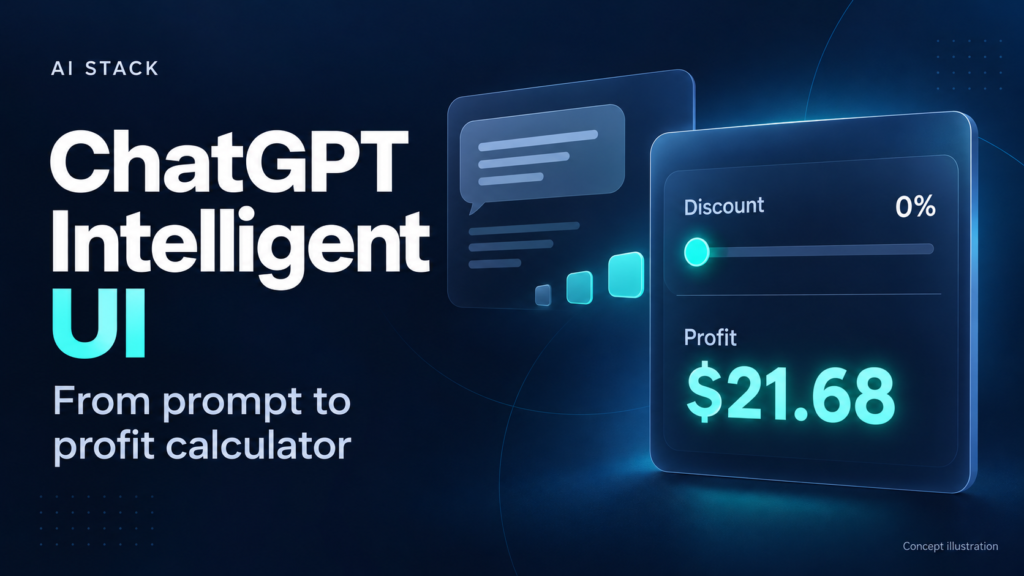
That is a useful business question to put in front of ChatGPT Intelligent UI. An interactive calculator lets you change the discount, advertising cost or selling price and explore the consequences directly in the conversation. Here is what the AI Stack example shows, why the prompt matters and what to check before trusting the result.
Watch the AI Stack demonstration: ChatGPT’s Interactive UI Changes How You Work
What ChatGPT Intelligent UI changes
Intelligent UI is ChatGPT’s ability to respond with interactive elements such as forms, buttons and charts. You can ask it to create a small tool for the question at hand, then use the controls inside the conversation. OpenAI introduced the capability in its October 7, 2026 announcement.
A profit calculator makes the idea easy to understand. Once the interface appears, you can move a slider or edit a cost instead of sending another message for each scenario. A clearly specified formula keeps the assumptions consistent as you explore different inputs.
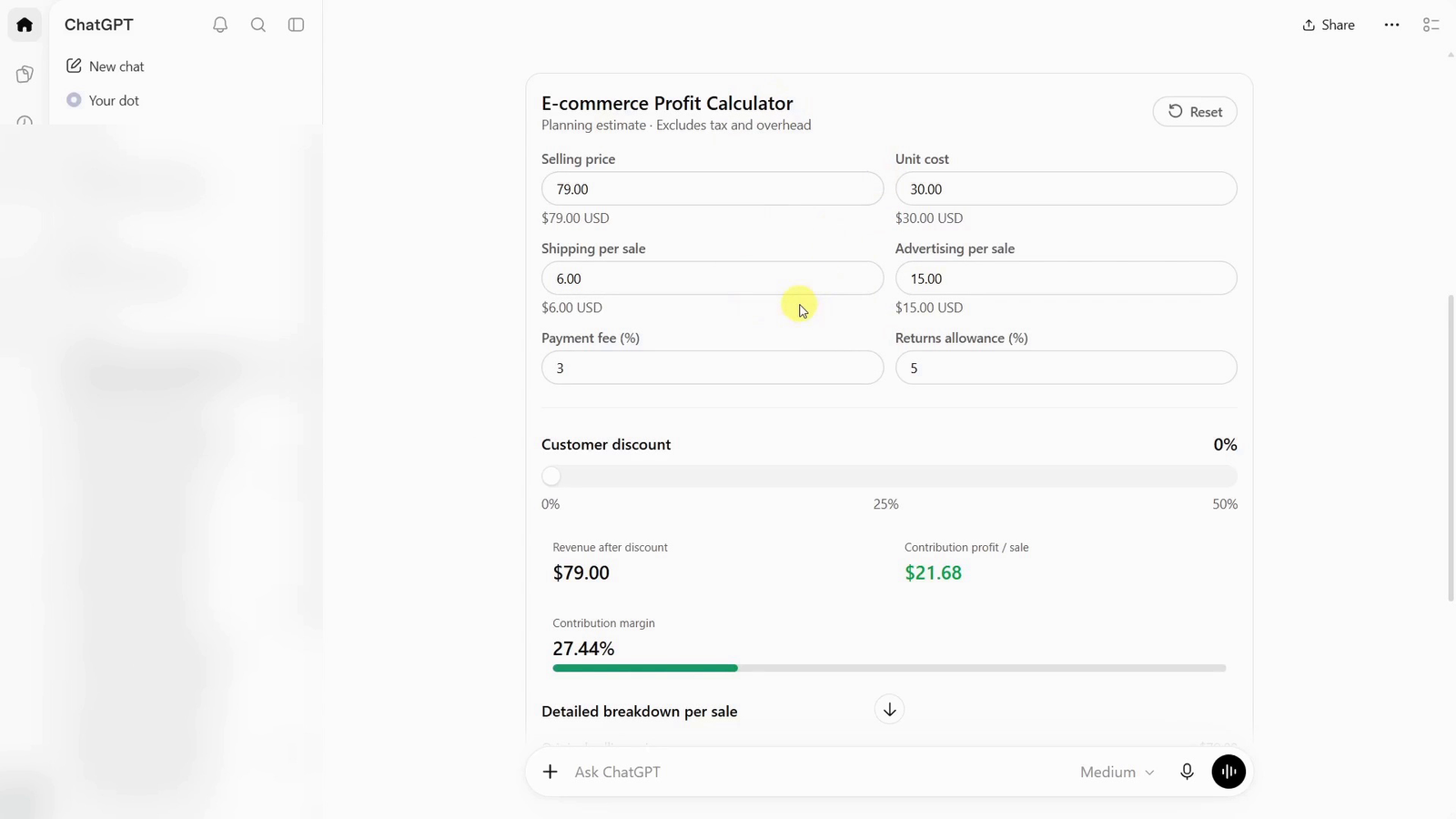
The starting point: $21.68 contribution profit at full price. AI Stack, 02:10.
The discount that cuts profit by two-thirds
The example starts with a selling price of $79.00. Product cost is $30.00, shipping is $6.00 and advertising is $15.00 per sale. A payment fee takes 3% of discounted revenue, with another 5% reserved as a returns allowance.
At full price, those assumptions leave $21.68 in contribution profit. Move the discount to 20% and revenue becomes $63.20. The two percentage-based costs fall slightly, but the product, shipping and advertising still cost $51.00.
| Result per sale | Full price | 20% off |
|---|---|---|
| Revenue | $79.00 | $63.20 |
| Contribution profit | $21.68 | $7.14 |
| Contribution margin | 27.44% | 11.30% |
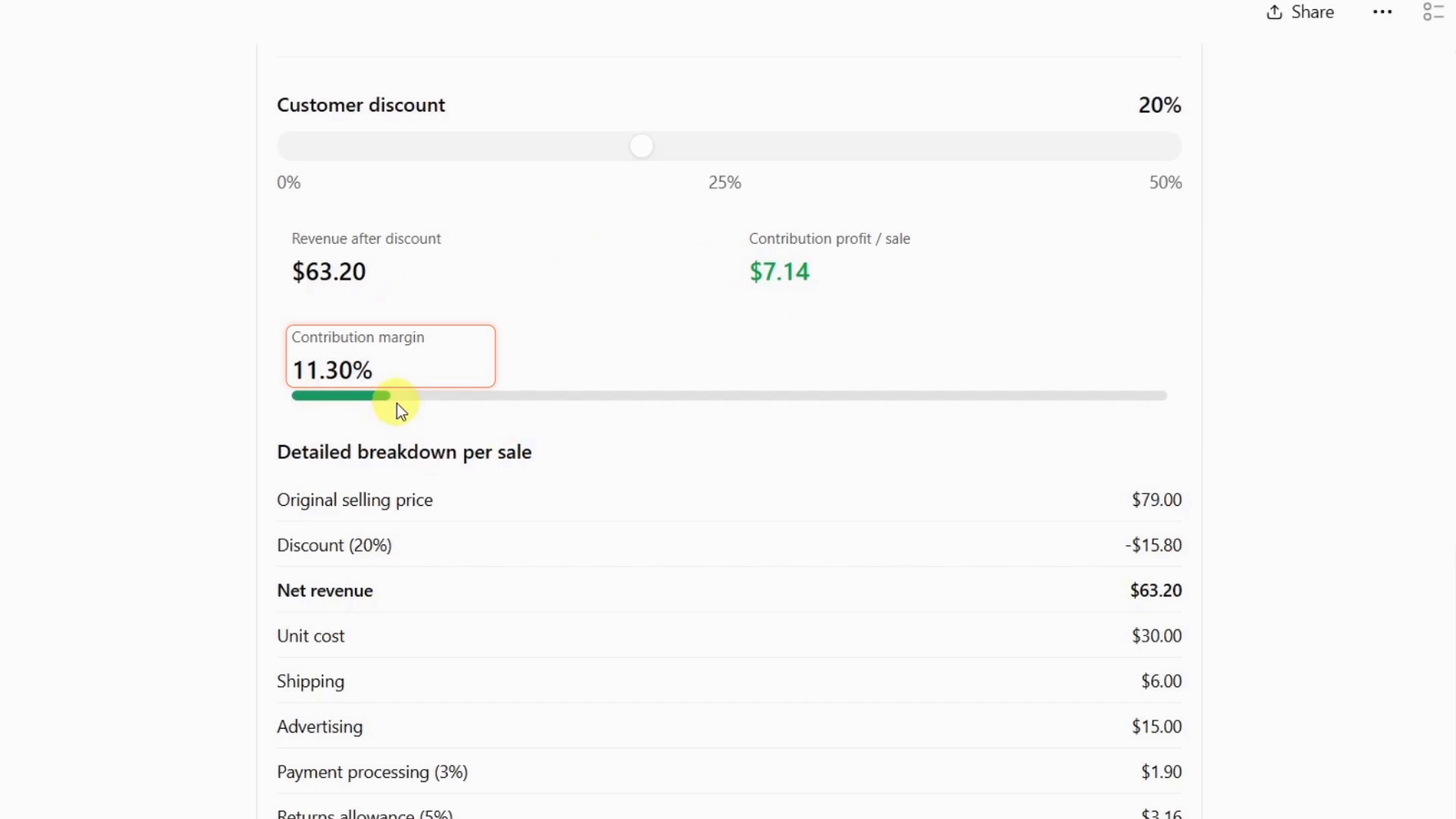
At 20% off, contribution profit falls to $7.14 and margin to 11.30%. AI Stack, 03:40.
The useful insight is the gap between the discount and its effect on profit. A seller looking only at the new price could easily miss how little room remains for another cost increase.
These are fictional planning figures. “Contribution profit” here means the amount left after the costs listed above; tax, overhead and other unlisted expenses are excluded. The returns allowance is an expense reserve based on revenue, not a claim that 5% of orders will be returned.
Why a specific prompt makes a better calculator
“Make me a profit calculator” leaves a lot for the model to decide. Which costs should it include? Does the payment fee apply before or after the discount? What should Reset restore?
The prompt used for this example makes those choices explicit. It asks for editable inputs, a 0%–50% discount slider, a Reset button, the calculation formula and a detailed cost breakdown. It also includes known results to check against, while requiring the calculator to compute them rather than hard-code them.
Formatting matters too. Every money value should display two decimal places, including whole-dollar inputs. At 20% off, the underlying profit is 7.144, displayed as $7.14. The calculator should preserve the full value internally when it calculates the 11.30% margin.
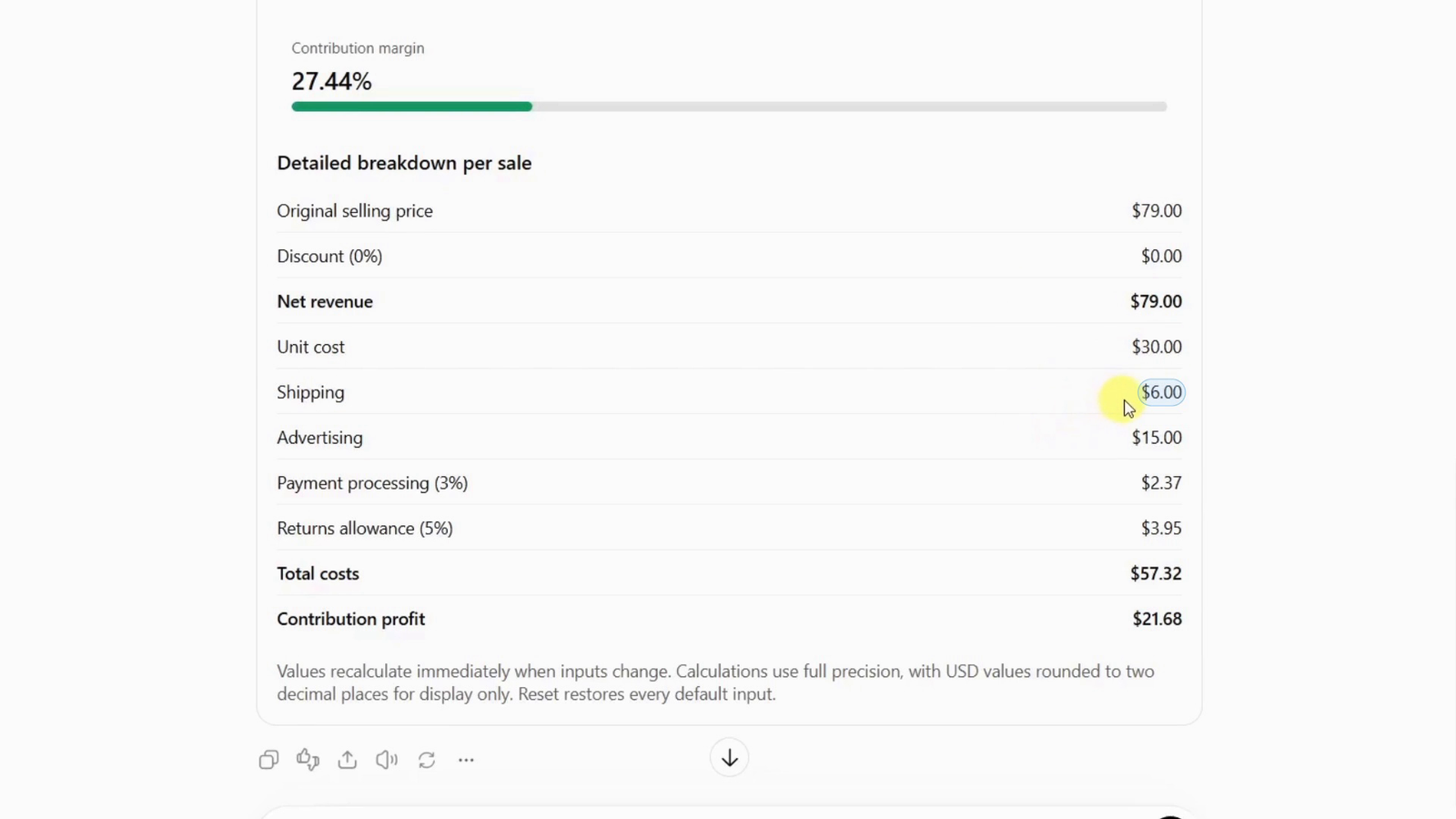
The cost breakdown makes each assumption visible: $57.32 in listed costs at full price. AI Stack, 02:40.
Those instructions make the output easier to inspect. They also make it easier to explain exactly what needs fixing if the first response is incomplete.
A useful starting point for other business questions
The same calculator can help explore advertising and shipping assumptions. Using the same formula, increasing advertising from $15.00 to $25.00 would leave $11.68 at full price. Combine that higher advertising cost with the 20% discount and the result becomes a $2.86 contribution loss per sale. This is an additional calculation from the example assumptions, rather than a separate live test.
That is where a small interactive tool can help: checking how several decisions interact before committing to an offer. You could adapt the approach to a service-pricing estimate or a budget planner, with clearly defined inputs and calculations.
The model still needs to match the business. A payment fee with a fixed transaction charge needs that extra cost. Shipping collected from customers needs appropriate revenue treatment. Monthly overhead should not be quietly mixed into a per-sale calculation without explaining how it is allocated.
Three checks before you rely on it
- Check the numbers. Confirm the $21.68 baseline and the $7.14 result at 20% off. Contribution margin is profit divided by discounted revenue, multiplied by 100.
- Check the controls. Change an input and confirm the results update. Reset should restore every original value, including costs you edited.
- Check the assumptions. Know what is excluded and how each cost is calculated. A polished interface cannot tell you whether your advertising or returns estimate is realistic.
If a result is wrong, ask for a focused correction and repeat those checks. For example, fixing currency formatting should preserve the formula and working controls. A message saying the problem is fixed is not evidence that the interface now behaves correctly.
Try the ChatGPT profit calculator prompt
Open a regular ChatGPT conversation and ask for the calculator directly in the chat. You do not need to hunt for an “Intelligent UI” switch. Interface labels can vary, and your account may not show a separate GPT-6 selector.
OpenAI’s announcement described rollout to paid tiers from October 7 and Free and Go from October 8, with Enterprise access dependent on administrator settings. It applies to ChatGPT’s Chat experience. Availability can vary; a text-only response is not a working interactive calculator.
Use the fictional defaults first, then adapt them after the checks pass.
Copy the full profit-calculator prompt
Create a native interactive e-commerce profit calculator directly in this ChatGPT conversation, with editable inputs, a discount slider and a Reset button. Provide usable controls here, not just code or a static table.
Default inputs: selling price $79.00; unit cost $30.00; shipping $6.00; payment fee 3% of discounted revenue; advertising cost $15.00 per sale; returns allowance 5% of discounted revenue; discount 0%.
Discount slider: 0%–50% in 1-percentage-point steps. Recalculate when any input changes. Reset must restore ALL original defaults.
Display revenue after discount, contribution profit per sale, contribution margin and the detailed cost breakdown.
Calculate with full precision: revenue = price × (1 − discount/100). Profit = revenue − unit cost − shipping − advertising − revenue × payment fee/100 − revenue × returns allowance/100. Margin = profit/revenue × 100; show undefined when revenue is zero.
STRICT FORMATTING: Every displayed monetary input and output must be USD with exactly TWO decimal places, including whole-dollar values, negative amounts, summaries and cost breakdowns. Apply the currency formatter to every visible monetary value; never display raw floating-point results. Show $79.00, $21.68 and $7.14, not $79, 7.144 or long decimals. Display contribution margin with two decimal places. Keep calculations at full precision and round only for display. Preserve this formatting after input changes and Reset.
Check the calculated results: at 0% discount, revenue $79.00, profit $21.68, margin 27.44%; at 20%, revenue $63.20, profit $7.14, margin 11.30%. Calculate from the inputs; do not hard-code these outputs. Label the calculator as a planning estimate excluding tax and overhead.
The broader lesson is simple: define a useful question, make the assumptions explicit and verify the result. Intelligent UI gives that question controls you can work with. The value comes from seeing the consequences clearly enough to make a better-informed decision.
Open ChatGPT to try the example. The AI Stack video shows the demonstration, and the tutorial resource post contains the original prompt. Explore more AI and tech tutorials on Find Best Solution.