Changing a promotional price from $29 to $39 should be a small job. The headline, colours and layout have already been approved. What matters now is whether the new price can be edited without disturbing the rest of the design.
That is the practical question behind this PhotoCraft + Codex review. The AI Stack demonstration uses a promotion for fictional yoga and breathwork business STILL / STUDIO to explore an AI-led design workflow: give Codex the brief, use PhotoCraft to build an editable asset, then check whether the price remains editable.
The promising part is the reusable source file. PhotoCraft is free and open source, but it is still early alpha. This example is a useful test of a small business task, rather than evidence that every professional Photoshop workflow is ready to move.
Watch Free Photoshop Alternative? PhotoCraft + Codex Tested
What PhotoCraft does and where Codex fits
PhotoCraft is an image editor from the ArtCraft family. Its official product page describes a native application with layers, masks, editable type, vectors and brushes, available for Windows, macOS and Linux. It can be downloaded on its own or through the ArtCraft Launcher.
In this workflow, Codex interprets the request and operates the tools; PhotoCraft performs the image-editing work. Keeping those roles clear helps explain both the opportunity and the setup. The natural-language request belongs in the agent conversation. It is not evidence of a built-in PhotoCraft chat interface.
PhotoCraft provides a command-line interface, or CLI, that can create and inspect documents, run editing commands and save the results. That allows work to happen without a visible sequence of mouse clicks. The official CLI documentation lists the available operations and recommends checking the installed tool’s help for the commands supported by that version.
The practical requirement is an agent session with access to the installed tool and the project folder. Simply pasting a brief into a chat without that access will not produce the same workflow. PhotoCraft’s free download also does not make a separate AI service’s access or usage free.
A business promotion with something worth testing
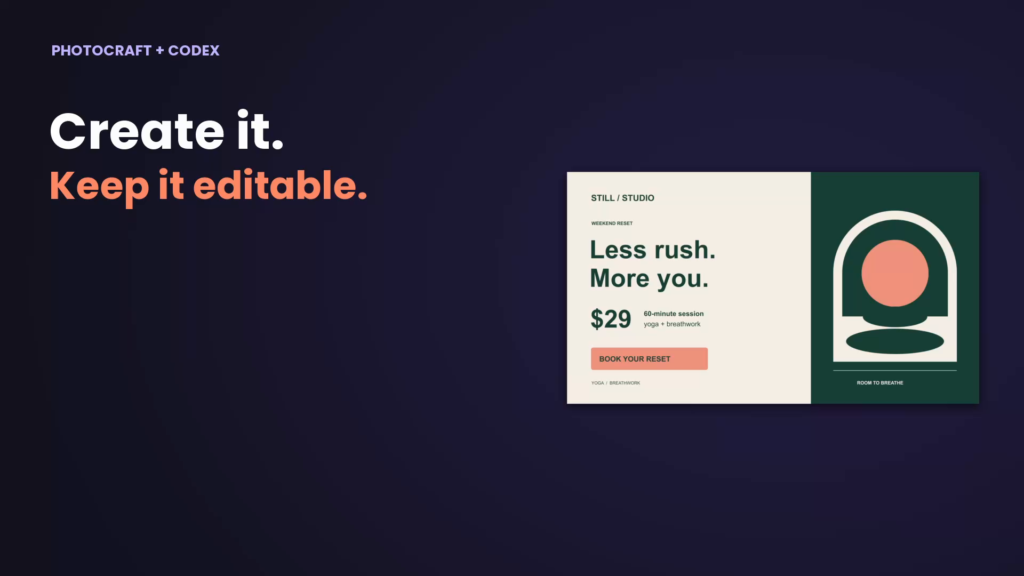
The example is deliberately straightforward: a 1920 × 1080 landscape promotion for STILL / STUDIO, a 60-minute yoga and breathwork session, and a clear booking call to action. The initial offer is $29. The studio and offer are fictional; the design is a demonstration, not a live booking service.
A small business would recognise this kind of job. A class price changes, a workshop date moves, or a seasonal offer needs updating. The owner wants to preserve a design that already works and change the relevant detail.
That gives the test a more useful standard than whether the first image looks attractive. Can you still edit the words? Can you identify and change the correct element? Can it save a revised version while keeping the original? Those are the questions that determine whether a promotional asset can be used again.
Why the $29 to $39 revision matters
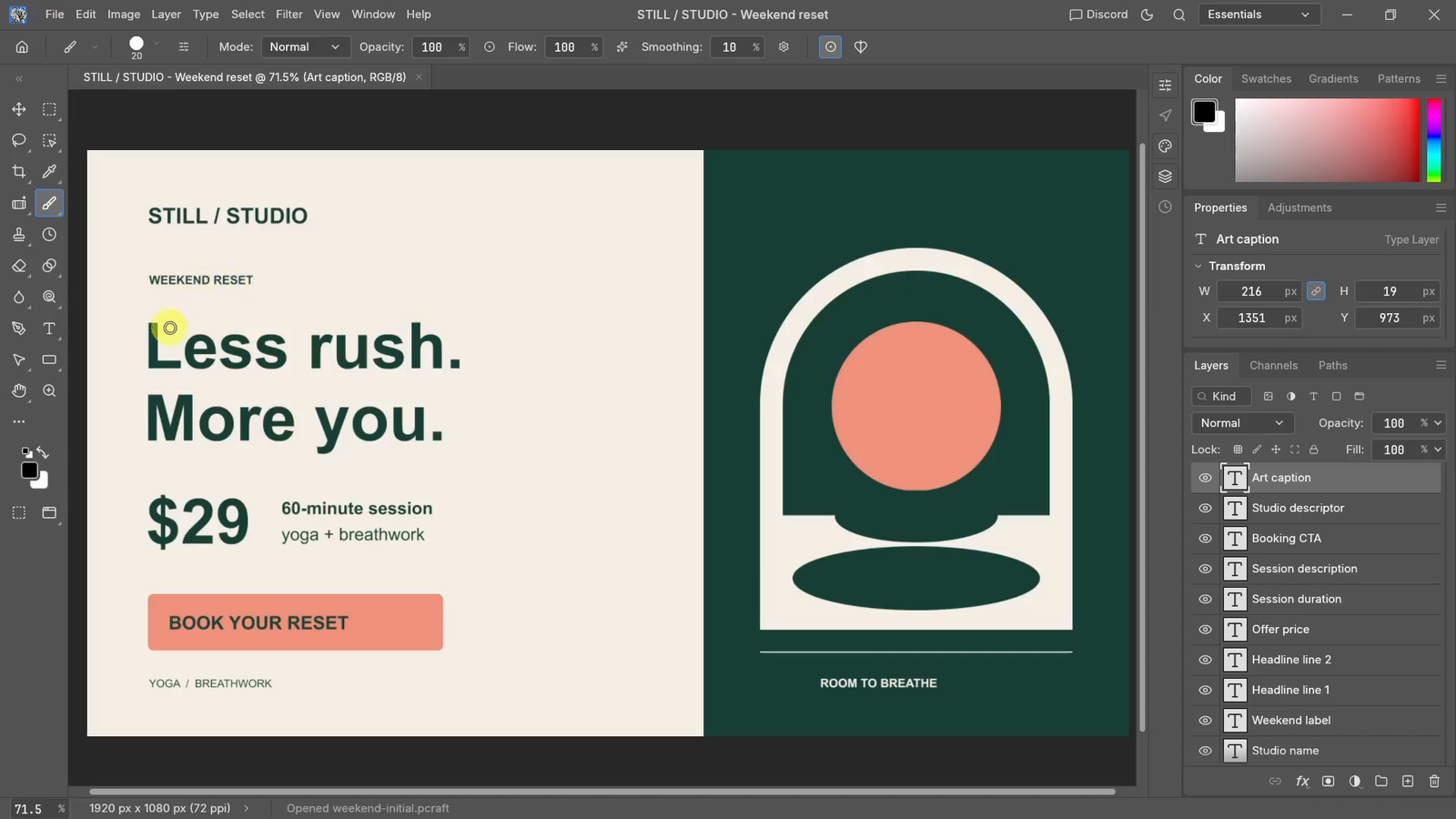
The visible edit is small but revealing: the offer price changes to $39 within the existing design. The video shows the original $29 design with its text layers at 03:49, then the $39 version with the “Offer price” Type layer selected at 04:18.
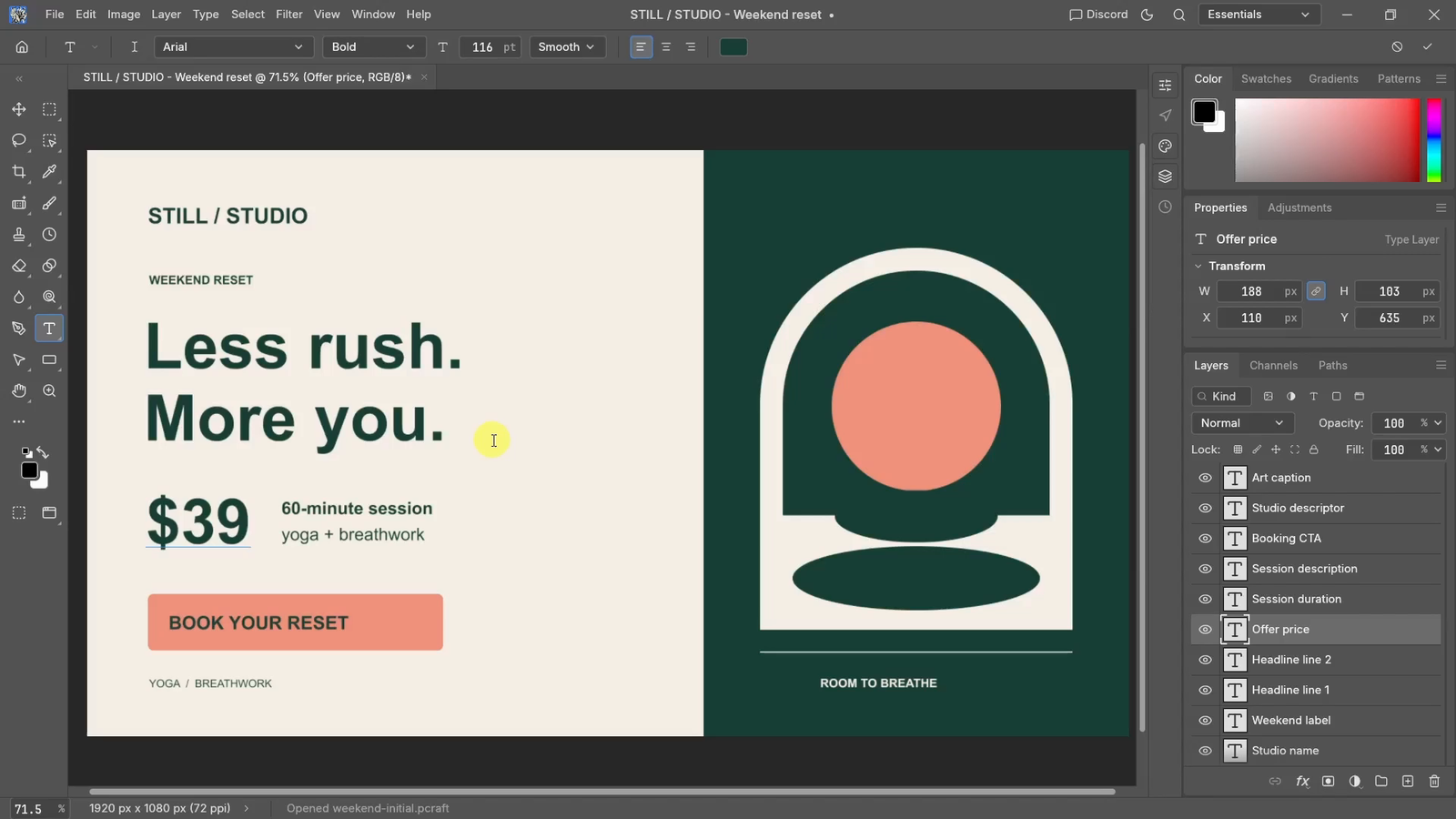
With editable text, that change can target the price element itself. Rebuilding the whole image creates more things to check: the headline might wrap differently, a decorative shape might move, or the call to action might change. Even when the new image looks good, it can introduce another approval round.
At 03:27, the on-screen Codex report lists 20 layers, including 10 editable type layers, using PhotoCraft CLI 0.7.0. Those counts come from the displayed report. The editor views then show why that structure matters: individual text elements remain available to edit.
For repeat business work, ask for named layers such as “Offer price”, “Headline” and “Call to action”. Then describe both the change and the boundaries: update this text, retain its formatting and position, and leave the other layers alone.
Review the before and after at the same size. Read every line, then look away from the price and check the rest of the composition. A completion message is useful context; the files are what establish whether the edit worked.
The editable master is as important as the PNG
A PNG is convenient for publishing or sharing the finished artwork. It is a flattened image, so it does not retain separately editable text layers. Keep the .pcraft project as the editable master alongside the exported PNG.
Saving a project is only part of the check. Reopen the saved source, confirm that the price is still editable, and export it again. Comparing that export with the approved image helps catch changes that are easy to miss during creation.
Use separate names for the original and revised versions. If the offer later returns to $29, you should not have to reconstruct the old design from a screenshot. For a larger campaign, keep the approved copy, source project and delivery images together.
A reusable brief for your own PhotoCraft test
Start with a small, low-risk design and exact business copy. The creation brief below is an adaptable starting point, not a promise of a one-prompt result. The optional revision brief is an additional agent-driven task you can test; the video frames here show the price being edited in PhotoCraft’s Type tool.
Copy a creation and revision brief
Creation brief
Use the installed PhotoCraft command-line tool to create a 1920 × 1080 horizontal promotion for fictional STILL / STUDIO. First check the installed version, available commands and required fonts. If access is missing, explain the blocker before proceeding.
Use forest green, warm cream and coral, clear typography and geometric artwork. Exact copy: STILL / STUDIO; Less rush. More you.; $29 for a 60-minute yoga + breathwork session; BOOK YOUR RESET.
Build the design through PhotoCraft. Keep the headline, price and call to action as editable text, with clearly named layers. Do not invent testimonials, booking links or scarcity claims. Save a new .pcraft master and PNG in the project folder without overwriting existing work. Show the PNG and report any warnings or manual fixes.
Optional agent revision brief, after approving the first design
Inspect the saved project and change only the Offer price text from $29 to $39. Keep its font, size, colour and position, and preserve every other layer. Do not rebuild the promotion. Save a separate revised .pcraft and PNG, keeping the originals.
Compare the documents and images for unexpected changes. Reopen the revised source, confirm the text is still editable and export again. Report what changed and whether the reopened export matches the approved result. If a check fails, explain it clearly.
This keeps the work focused on the outcome while giving the agent clear acceptance criteria. You still decide whether the design suits the business and whether the offer is correct.
Where the workflow could help a small business
A reusable promotion is a sensible starting point for class offers, event announcements and service packages. Build one approved layout, retain its source, and test controlled revisions before expanding to a collection of variants. These are possible applications of the approach, not additional campaigns tested in the video.
The business decision deserves its own check. Changing a price in an image is easy to approve visually; deciding what to charge needs numbers. Our ChatGPT interactive profit calculator example offers a related way to explore selling prices, discounts and the amount left after costs.
Do not assume a successful design edit proves hours saved or better sales. Measure the time needed for setup, corrections and review on your own task. A workflow is useful when the complete process is manageable, including the checks.
Is PhotoCraft ready to replace Photoshop?
For daily professional work, caution is warranted. The official repository calls PhotoCraft early alpha and explicitly warns that it is not yet a replacement for professional Photoshop use. Its listed gaps include generative features, typography depth, professional workflows and plug-in compatibility. That status was checked on October 13, 2026.
This promotion test does not establish PSD interchange, complex retouching reliability or support for an existing Photoshop plug-in workflow. If you need those capabilities, test copies of representative files through the full open, edit, save and reopen cycle before relying on the application.
The useful takeaway is narrower and practical: PhotoCraft is worth exploring for AI-led, editable promotional work where precise revisions matter. Keep the source, inspect the output and make the second edit part of the test. That tells you much more about a reusable workflow than the first attractive export alone.
Get PhotoCraft from the official site, open the PhotoCraft video tutorial, or explore more AI and tech video tutorials.