

Collecting information from websites is a common task for businesses. Whether you are researching competitors, building a lead list, analyzing market trends, or gathering product information, manually copying data from websites can quickly become time-consuming.
Thunderbit makes this process easier by using AI to extract structured data from websites without requiring coding knowledge.
In this Thunderbit tutorial, we will walk through how to scrape real estate listing data from Redfin, use AI to identify the fields we need, extract information from subpages, add custom AI instructions, and export the final results into a spreadsheet.
By the end of this guide, you will understand how Thunderbit can help automate repetitive data collection tasks for business workflows.
What Is Thunderbit?

Thunderbit is an AI-powered web scraping tool that allows users to collect structured information from websites without writing code.
Traditional web scraping often requires technical knowledge, including HTML inspection, selectors, scripts, and custom automation workflows. Thunderbit simplifies the process by allowing users to describe what information they need and letting AI handle much of the extraction setup.
Thunderbit works directly through a Chrome extension, making it accessible for business users who need data but do not want to build custom scraping solutions.
Common use cases include:
- Market research
- Lead generation
- Competitor analysis
- Real estate research
- Product research
- Business directory extraction
Manual Data Collection vs Thunderbit AI Scraping
| Manual Data Collection | Thunderbit AI Scraper |
|---|---|
| Copy and paste information manually | AI identifies and extracts data automatically |
| Time-consuming for large datasets | Collect hundreds of records faster |
| Requires technical skills | No coding required |
| Requires repetitive work | Automates the extraction process |
| Difficult to maintain | Easy to update and repeat workflows |
For businesses that frequently collect web data, reducing manual effort can save significant time
Installing the Thunderbit Chrome Extension
Thunderbit works through a Chrome extension.
To get started, open the Thunderbit Chrome extension page, add the extension to Chrome, and pin the extension to your browser toolbar for easy access.
Once installed, Thunderbit is available directly inside your browser whenever you need to extract information from a website.
Example: Extracting Real Estate Data From Redfin
To demonstrate Thunderbit, we will use a real estate research example.
Imagine you are a real estate professional analyzing properties in Dallas. You want to collect information about available homes, including property address, price, number of bedrooms, number of bathrooms, square footage, property details, and additional listing information.
Normally, this would require opening each property listing and manually copying the information into a spreadsheet.
With Thunderbit, the process can be automated.
Open a Redfin search results page containing multiple property listings and launch the Thunderbit AI scraper.
Choosing a Data Source
Thunderbit allows you to select different types of data sources.
The Current Page option extracts information from the webpage currently open in your browser. This is useful when you are viewing a search results page or a directory page.
The List of URLs option allows you to provide multiple URLs and let Thunderbit process each page. This is useful when you already have a collection of webpages you want to analyze.
Thunderbit can also extract information from supported files or images.
For this example, we use the current Redfin search results page.
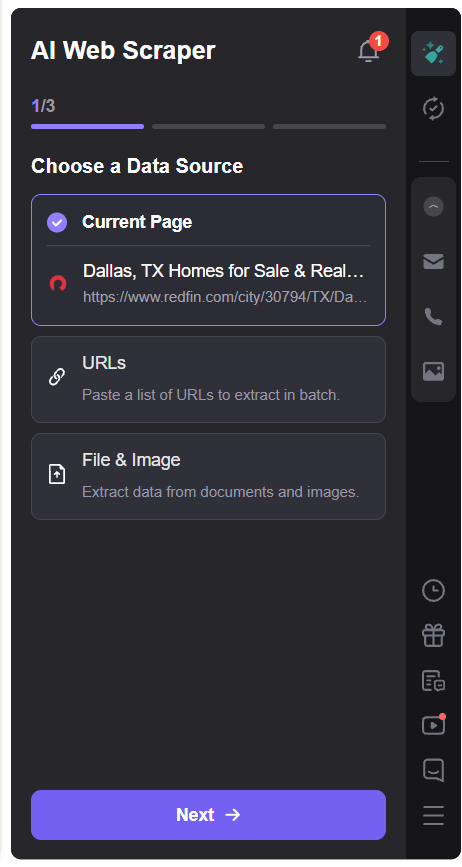
Thunderbit data source selection
Handling Pagination and Infinite Scroll
Websites display additional information in different ways.
Some websites use traditional page numbers, while others load more results when users scroll. Thunderbit can detect and handle different navigation methods.
No Pagination means that Thunderbit extracts only the information currently visible on the page.
Click Pagination is used by websites that display page numbers or a Next button. Redfin uses page navigation where users can move through additional pages of property listings. Thunderbit can automatically navigate through these pages and collect more records.
Infinite Scroll is used by websites that load additional content as you scroll. Google Maps is a common example. Instead of clicking page numbers, more businesses appear automatically as you scroll.
Thunderbit can detect infinite scroll pages and continue collecting data based on your selected scroll settings.
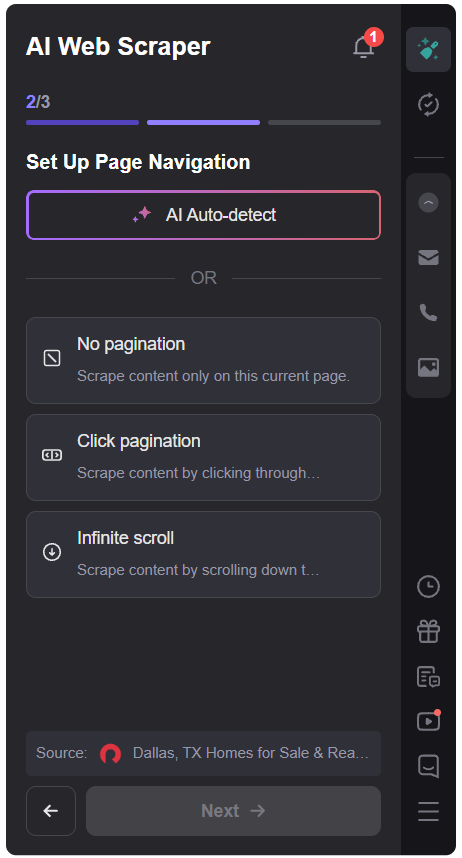
Thunderbit pagination detection
Using AI Suggest Fields
One of Thunderbit’s most useful features is AI Suggest Fields.
Instead of manually defining every column you want to extract, Thunderbit analyzes the webpage and recommends relevant fields automatically.
For a real estate listing page, Thunderbit can identify information such as property address, property URL, price, bedrooms, bathrooms, square footage, and property details.
These suggested fields can be customized based on your specific business requirements. You can remove fields you do not need or add additional fields.
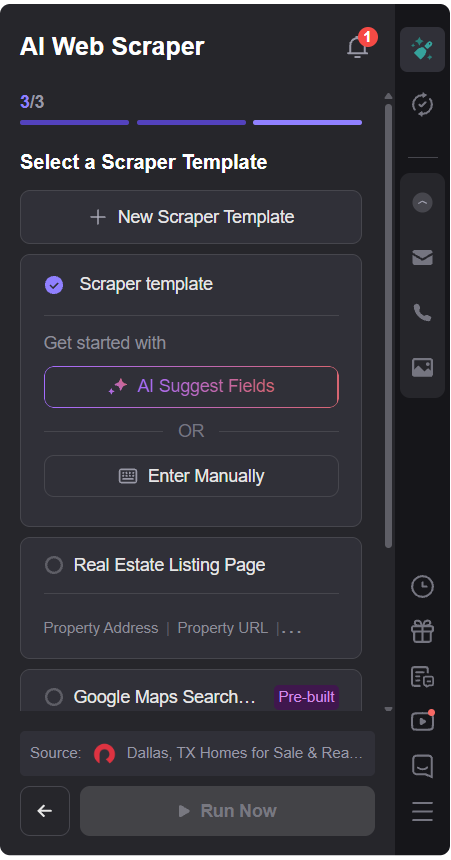
AI Suggest Fields
Scraping Information From Subpages
Many websites only show basic information on their main results page. The detailed information is often located inside individual pages.
For example, the Redfin search results page may show the address, price, bedrooms, and bathrooms. The individual property page may contain the property description, sales history, public records, and additional features.
Thunderbit can follow these links and collect information from the subpages automatically.
This allows you to combine information from multiple pages into a single dataset.
For businesses, this is especially useful because important information is often located on detail pages rather than the main search results page.
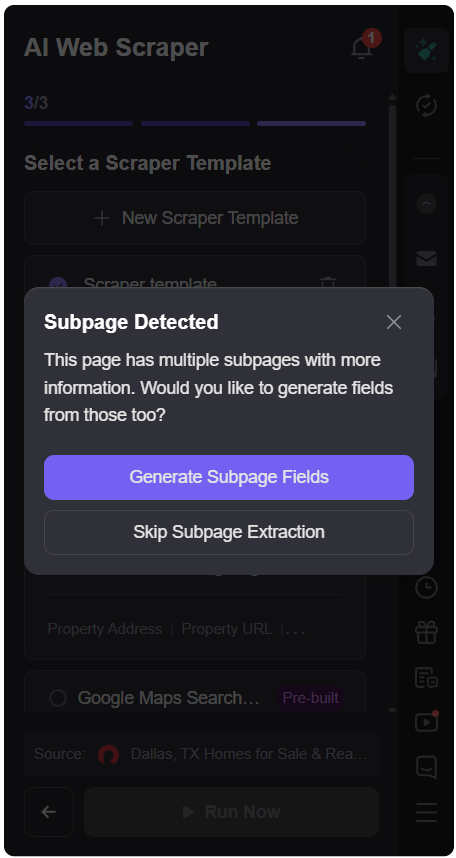
Subpage scraping fields
Adding Custom AI Fields
Thunderbit also allows you to create custom fields using natural-language AI instructions.
For example, you can add a field called Property Highlights.
You can then provide an instruction such as:
Summarize property highlights in one or two sentences.
Thunderbit applies this instruction to each extracted record and generates additional information automatically.
Custom AI fields can be useful for summarizing descriptions, categorizing products, classifying companies, creating sales notes, and generating short summaries.
You can customize the output based on your business workflow without writing code.
Running the Scraper
Once the fields are configured, Thunderbit can run the extraction process.
Thunderbit provides different extraction modes, including browser-based extraction. Browser mode allows you to watch the scraping process as it happens.
During the extraction, Thunderbit collects information from the selected pages and organizes the results into rows and columns.
Instead of manually copying information from hundreds of listings, you receive a structured dataset.
Reviewing the Extracted Data
After the scraping process is complete, Thunderbit displays the results in a table format.
Each record appears as a row, and each extracted field appears as a column.
The final dataset may include property address, property URL, price, bedrooms, bathrooms, property details, sales history, public record information, and AI-generated property highlights.
Before exporting, you can review the results and confirm that the required information has been collected.
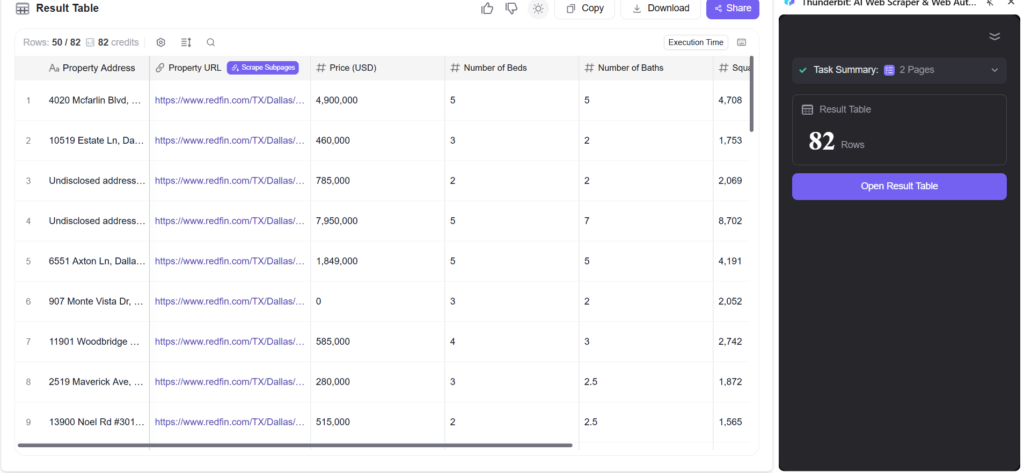
Thunderbit results table
Exporting Thunderbit Data
Once the data is ready, Thunderbit provides several options for using the extracted information.
You can download the results, copy the data, or share the results.
For this example, the data is exported as an Excel spreadsheet.
After downloading the file, you can open it in Excel and continue working with the data.
The exported spreadsheet contains the extracted fields along with any custom AI-generated information.
Using Thunderbit Pre-Built Templates
In addition to AI-powered scraping, Thunderbit provides pre-built templates for common websites and workflows.
Templates are useful when you want a faster setup for frequently used data collection tasks.
Examples may include Google Maps search results, Zillow property listings, Amazon product information, YouTube data, job listings, and social media research.
Templates provide predefined fields, making common scraping workflows faster to configure.
Example: Scraping Local Businesses From Google Maps
As another example, you can use Thunderbit to collect local business information from Google Maps.
Imagine you want to build a list of plumbing companies in your area.
Thunderbit can extract information such as business name, address, phone number, website, ratings, and other available business details.
Google Maps uses infinite scrolling instead of traditional page numbers, and Thunderbit can detect this automatically.
You can specify how many scroll actions Thunderbit should perform and collect the available business listings.
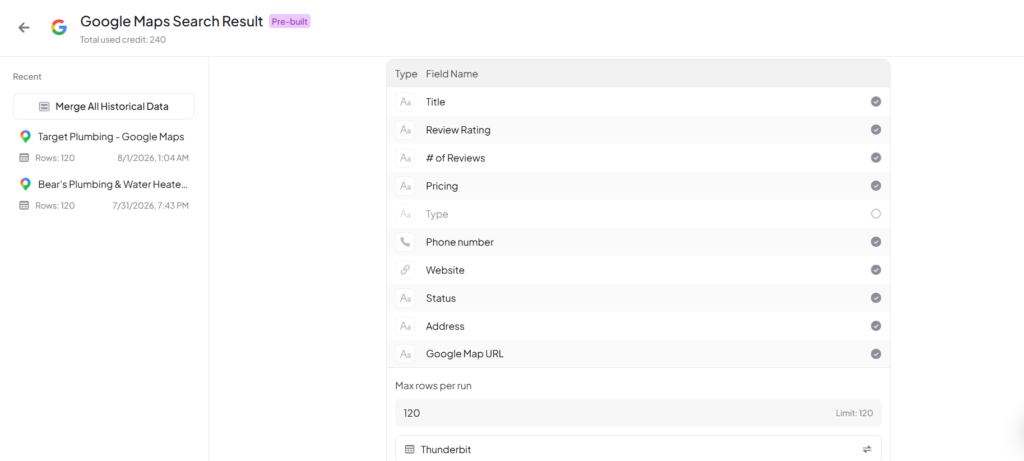
Google Maps template
Business Use Cases for Thunderbit
- Lead Generation
- Collect company information from directories and create prospect lists for sales teams.
- Monitor competitor websites, products, pricing information, and services.
- Competitor Research
- Market Research
- Gather information from websites and organize it into structured datasets.
- Real Estate Analysis
- Collect property listings, prices, features, and market information.
- Collect property listings, prices, features, and market information.
- Product Research
- Analyze products, reviews, and pricing from ecommerce websites.
- Local Business Research
- Create business lists from online directories and mapping platforms.
Final Thoughts
Thunderbit simplifies web data collection by combining AI with no-code scraping.
The workflow is straightforward:
- Install the Thunderbit Chrome extension.
- Open the website containing the information you need.
- Select your data source.
- Let AI detect navigation and page structure.
- Use AI Suggest Fields to identify the required information.
- Extract data from subpages when needed.
- Add custom AI fields using natural-language instructions.
- Run the scraper and export the results.
For business users who regularly collect information from websites, Thunderbit can reduce repetitive manual work and turn webpages into structured data that is ready for analysis.
Install Thunderbit by using below link:
https://thunderbit.pxf.io/enBmE6
For a complete visual walkthrough, watch the Thunderbit tutorial on Youtube Channel: